Installing and Using Logisim Evolution
Logisim is an educational digital logic design and simulation tool, suitable for learning and validating combinational logic, sequential logic, and simple CPU datapaths. It was originally created by Dr. Carl Burch and actively developed until 2014.
Key features include:
- Visual circuit construction with drag-and-drop editing
- Built-in components such as logic gates, flip-flops, registers, and memory
- Clock-driven simulation and cycle-by-cycle stepping
Researchers at several Swiss higher-education institutions improved Logisim to better support modern operating systems and larger circuits; the improved fork is Logisim Evolution. In this manual we use Logisim Evolution 4.1.0.
Installation
Section titled “Installation”Logisim Evolution is a cross-platform digital circuit simulator based on Java, and it runs on Windows, Linux, and macOS.
Step 1: Install a Java runtime
Section titled “Step 1: Install a Java runtime”Logisim Evolution requires Java 21 or later. Choose an appropriate JDK distribution for your OS:
- Windows: install OpenJDK / Oracle JDK / Microsoft Build of OpenJDK; set
JAVA_HOMEand add$JAVA_HOME/bintoPATH. - Linux: install via your package manager or via SDKMAN.
- macOS: install via Homebrew or download an installer package.
Step 2: Download and run the JAR
Section titled “Step 2: Download and run the JAR”Go to the Logisim Evolution releases page:
Download logisim-evolution-<version>-all.jar and start it with:
java -jar logisim-evolution-<version>-all.jarBasic configuration (UI language)
Section titled “Basic configuration (UI language)”On first launch, Logisim Evolution selects the UI language based on your OS locale. If you are using an English OS but want to follow the steps in a Chinese UI, you can switch languages manually:
- In the menu bar, click Window → Preferences.
- In the settings dialog, open the International tab.
- Under Language, select Chinese.
This manual’s UI descriptions (in later chapters) assume the Chinese UI, so it’s recommended to change this before starting.
Interface overview
Section titled “Interface overview”After launching Logisim Evolution, the main window consists of:
- Component library (top-left): components grouped by category (e.g., Wiring, Gates, Plexers, Memory, I/O).
- Circuit editor (center canvas): where you build and view circuit structures.
- Properties panel (bottom-left): edit properties of the selected component (bit width, direction, label, etc.).
- Menu and toolbar: create/save projects, control simulation, and manage the clock.
See Figure 1.1 for a screenshot of the Logisim Evolution interface.
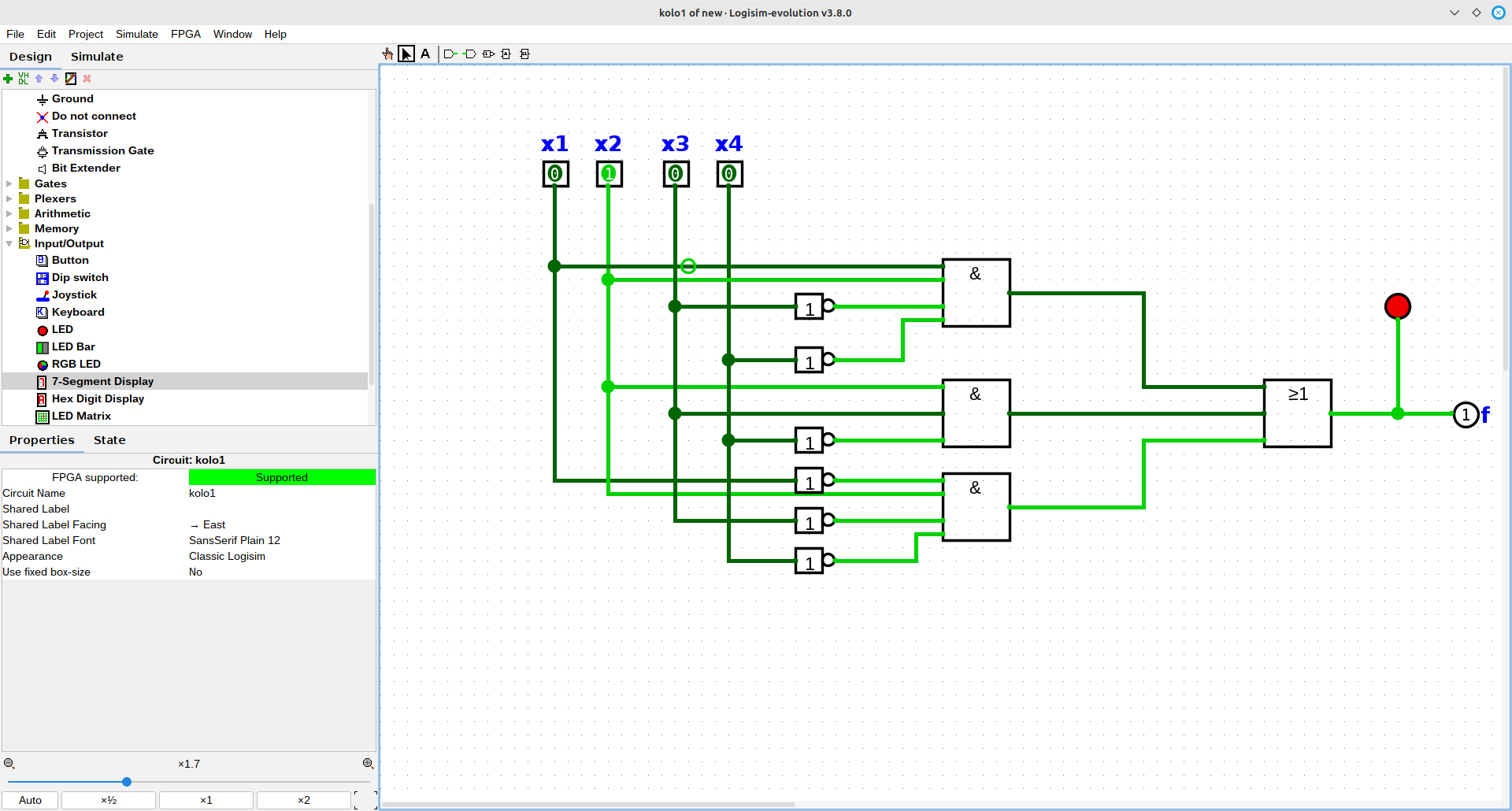
Figure 1.1: Logisim Evolution graphical interface.